Scroll & Collage Maker: InsMix
- 4.6
- Rating
- 1.00M
- Installs
- Free
- Price

 Analysis by App-foxy
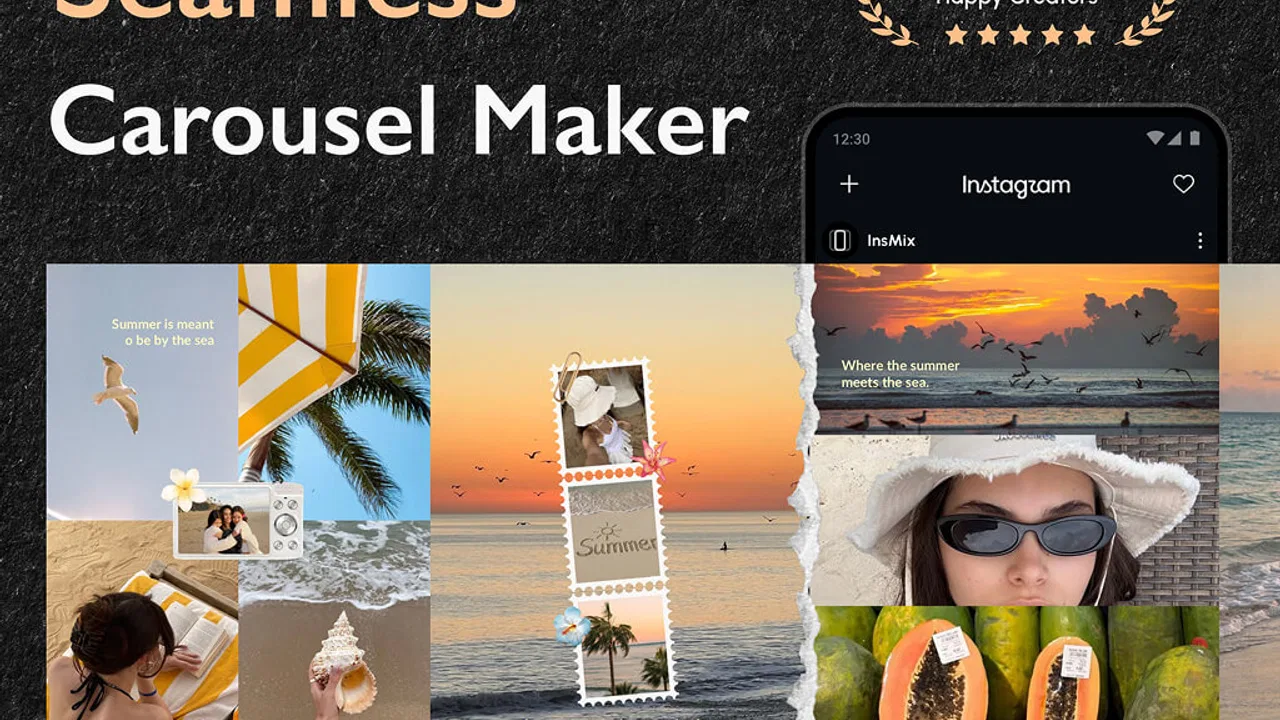
I spent time with Scroll & Collage Maker: InsMix as a photography app, mainly to see whether its carousel-focused approach actually makes preparing social posts easier on a phone. My first impression was that it is less about making one decorative picture and more about arranging several images so they feel connected when someone swipes through them. That distinction matters if you regularly post travel sequences, product details, outfit photos, event highlights, or any story that works better as a continuous visual flow than as a single square.
InsMix is made by Daily Joy Studio and is available for free, with optional in-app purchases ranging from a few dollars to the low twenties per item. It is rated for Everyone, runs on Android 9 or later, and its current version is 1.8.2. The app has reached over a million installs and holds a 4.5 average from around nine thousand ratings, so it is clearly aimed at a broad audience rather than only experienced designers.
What makes it interesting is the combination of a collage maker, an Instagram post maker, and tools for seamless carousel, scroll, and other social layouts. In practice, I found the useful question was not simply “Can it place photos in a frame?” Most editors can do that. The better question is whether it helps me build a post that remains readable, balanced, and visually consistent from the first image to the last.
You May Also Like

 Blood Strike: 2.5 Anniversary
Blood Strike’s Loadouts Turn Every Drop Into a Tactical Gamble
A close look at Blood Strike’s custom loadouts: how fast access to signature weapons reshapes its battle royale rhythm, rewards preparation, and narrows the gap between fights.

 Pandora - Music & Podcasts
Pandora’s Music Is Easy to Start, but Harder to Recover
Pandora’s strength is its low-effort path from a seed to a station. Its weak spot is how much confidence it asks you to place in connection, setup, and quiet recovery.

 8 Ball Pool
 Is Built on Rivalries, Rematches, and Routine
A close look at the rivalries, rematches, shared routines, and unanswered safety questions that turn a quick pool match into a persistent mobile community.

 Samsung Music
’s Quiet Strength Is Playing What You Already Own
Its reach comes less from spectacle than from dependable access to a personal library. That simplicity is both the app’s strongest retention engine and its ceiling.

 AccuWeather: Weather Radar
AccuWeather Review: A Quick, Clear Forecast for Everyday Decisions
For everyday plans, the best forecast is the one you can understand quickly. AccuWeather makes rain timing, radar, and local conditions easy to act on, with a few trade-offs.

 Hill Climb Racing
Why Hill Climb Racing Still Turns Crashes Into One More Run
A tiny car, a bumpy hill and one more upgrade: Hill Climb Racing keeps resurfacing because its simple chaos makes every near-miss feel personal.
More From Our News Desk
View All News


Where connectivity changes the editing experience
InsMix feels most comfortable when I am connected and ready to move between choosing images, trying layouts, and preparing a finished social post. That is the kind of workflow many people expect from a modern photography app, but it also means the experience is tied to the conditions around the phone. A strong connection makes it easier to keep the process moving; a weak one can turn a quick design task into a series of pauses.
I would not treat the app as a guaranteed choice for a completely disconnected editing session. The practical approach is to open it before leaving reliable coverage, test the tools you need, and avoid beginning an important post when you are depending on unstable mobile data. I am deliberately careful here because the most useful way to judge InsMix is by its connected workflow, not by assuming that every part of it works without a network.
This matters when the app is being used for a last-minute post. Imagine taking photos at a small market, choosing a handful of them on the ride home, and wanting a smooth swipe sequence before reaching your destination. The layout work may be simple, but the surrounding process can involve loading content, moving between screens, and eventually sharing the result. If the connection slows down, the creative decision-making becomes harder because you are waiting instead of comparing options.
My advice is to separate the creative stage from the publishing stage whenever possible. I can choose the strongest images and decide on the order while I still have time, then make final adjustments and share later. This reduces the pressure of trying to solve composition, captions, and connectivity all at once. It also makes it easier to notice whether a photo is carrying too much visual weight at the beginning or end of the sequence.
For people who use social platforms heavily, InsMix has a clear advantage over a basic photo editor: it encourages thinking in sequences. A normal editor usually asks me to perfect one image at a time. InsMix is more useful when the relationship between images is the main point. A close-up can follow a wide shot, a detail can echo a color from the previous frame, and a long image can be divided into a swipeable visual path instead of squeezed into one crowded canvas.
There is a trade-off, though. A connected, template-oriented workflow can make me browse and compare more than I intended. That is helpful when I want inspiration, but it can slow down a straightforward job. If all I need is a quick crop, exposure adjustment, or simple resize, a conventional gallery editor may get me to the result faster.
Why the carousel approach feels different
The strongest part of the app is its focus on continuity. With a regular collage, each photo usually sits inside its own box. That is fine for a family recap or a mood board, but the borders can make the final post feel like a collection of separate tiles. InsMix is better suited to layouts where the eye should travel from one panel to the next.
I found that the best results came from using fewer images than I first wanted. When every photo is important, the design becomes noisy even if the template is attractive. A more disciplined sequence gives the scrolling effect room to work. I would start with one establishing image, place the most informative detail next, and finish with something that gives the viewer a reason to continue or remember the set.
A useful trick is to choose images by shape before choosing them by subject. Wide scenes, portraits, close-ups, and screenshots do not occupy a layout in the same way. If I pick a group only because the photos are related, I may end up with awkward empty areas or faces placed too close to a dividing edge. Looking at the proportions first helps me avoid forcing a beautiful photo into a frame where it cannot breathe.
Another less obvious point is that seamless designs need safe visual boundaries. A face, product label, or important line of text should not sit directly where one panel meets another. The continuous effect is attractive, but it can also split the very detail I want people to notice. I would keep the central subject slightly away from the transition and use background texture, sky, walls, or repeated colors to carry the eye across the break.
Using it in real mobile situations
InsMix makes the most sense for people who create posts away from a desktop. I can picture using it after a day out, during a small business photo session, or while preparing a compact event recap from a phone. The app’s value is not only that it puts several images together; it helps turn a camera roll into a deliberate presentation without requiring a larger screen.
For a café owner, for example, a carousel could begin with the room, move to a featured drink, show a detail of the menu, and end with a wider view of the counter. A single collage might technically include all those photos, but a scrolling layout gives each moment more space. For a traveler, the same idea works with a street view, a landmark detail, a meal, and a final portrait. The sequence becomes a small narrative rather than a crowded poster.
On a smaller phone screen, I would keep text brief and test the design at normal viewing size. Tiny labels can look attractive while editing but become difficult to read once the post is viewed in a busy feed. The same caution applies to decorative elements: if they compete with the photos, the layout may look polished in the editor but confusing to someone swiping quickly.
The app is also a reasonable fit for casual creators who do not want to learn a full design suite. Its purpose is narrower and therefore easier to understand. I do not need to start with a blank canvas and invent every measurement. That saves time for a social post, especially when the goal is consistency rather than complete artistic control.
However, I would skip it if my work depends on highly exact brand layouts, detailed typography, or complex layer management. A professional design tool is usually better when every spacing value, font behavior, and export detail must be controlled. InsMix is strongest as a fast mobile composition tool, not as a replacement for a full desktop publishing environment.
What happens when a workflow goes wrong
The weak point of any multi-image editor is recovery. A single-photo edit is easy to redo, but a carousel can involve image order, cropping, spacing, and visual rhythm. If one selected photo changes late in the process, the rest of the design may need attention too. I recommend keeping the original images untouched and treating the InsMix version as a separate presentation rather than as the only copy.
When a design feels wrong, I would not immediately rebuild everything. First, I would remove the image that is creating the imbalance. Often the problem is not the template but one photo with a very different brightness, orientation, or subject scale. Replacing that one frame can restore the flow more effectively than changing the entire layout.
Connectivity can complicate recovery. If a screen takes longer than expected to load or a sharing step does not complete, patience is safer than repeatedly tapping every control. I prefer to pause, check whether the last change appeared, and then continue from the visible state. Rapid repeated actions can make it harder to know whether a design was saved, refreshed, or simply waiting.
Before publishing something important, I would review the complete sequence from the first panel to the last rather than judging each screen separately. This catches a common problem: two neighboring images may look fine alone but create a jarring jump in color or subject when viewed together. It also reveals whether the final panel feels like a conclusion or an abrupt stop.
One practical recovery habit is to prepare a simplified version. If the elaborate arrangement becomes difficult to finish, reduce the number of photos and keep the strongest visual relationship. A clean three-image sequence is usually more effective than a crowded design that was kept only because it took time to assemble. This is especially useful on a phone, where fatigue and interruptions are part of the editing environment.
Making better use of limited data
People who watch their mobile data should approach InsMix thoughtfully. Photography workflows can involve large images, and social publishing adds another network-heavy step. I would do the selection and most of the design while connected to dependable Wi-Fi, particularly when working with a large camera roll or preparing several posts.
It also helps to avoid importing every similar photo. Selecting a smaller group before opening the editor reduces visual clutter and can make the whole session more efficient. I usually begin by marking the images that have different jobs: opening scene, detail, human moment, supporting context, and ending frame. This is faster than loading a long sequence and deciding only after the layout becomes crowded.
For repeated work, I would keep a small personal checklist rather than assuming that the same arrangement will suit every post. Check the first image at thumbnail size, inspect the panel transitions, read any text without zooming, and look at the final frame as if it were the only one someone saw. These checks do not require extra design software, but they prevent the most common carousel mistakes.
There is another data-conscious choice that also improves quality: edit for the destination instead of preparing an oversized visual just because the original photo is large. I would decide whether the post needs a dramatic continuous image or a lighter sequence of individual pictures. The former benefits from careful transitions, while the latter may be better served by a normal collage or the social platform’s own tools.
InsMix’s free entry point makes experimenting easy, but optional purchases deserve a little restraint. I would first confirm that the basic workflow suits my posting habits before paying for anything. Someone who creates occasional personal posts may be satisfied without spending more, while a creator who repeatedly needs particular design options may find an upgrade worthwhile. The important point is to judge the purchase by saved time and improved results, not by the number of choices alone.
Who should use it and who should choose another editor
I would recommend InsMix to people who think in stories rather than isolated images. It is especially appealing for social users who want a carousel to feel intentional, small sellers who need product sequences, and travelers who want to preserve a visual route through several moments. The Everyone age rating also makes it approachable for general household use, although younger users should still have sensible guidance around sharing photos publicly.
It is less suitable for someone looking for a complete photo laboratory. If the main need is color correction, masking, raw processing, or detailed retouching, a dedicated photography editor will offer a deeper set of controls. If the main need is a quick one-image post, the phone’s built-in editor may be more direct. InsMix earns its place when arrangement and swipe-based presentation matter more than intensive image correction.
Compared with a standard collage app, its carousel orientation gives it a more focused purpose. Compared with a full design platform, it is likely to feel quicker and less intimidating, but also less open-ended. Compared with editing directly inside a social network, it offers a more deliberate preparation stage, though that extra step may feel unnecessary for spontaneous posts.
I would also think about audience behavior. A seamless layout rewards people who actually swipe through the post. If your followers usually see only the first image, put the clearest subject there and do not hide the main message in a later panel. The continuous effect should support the story, not require the viewer to work before understanding it.
My final view is positive, with a clear condition: use InsMix for connected, mobile-first visual storytelling, not as an all-purpose replacement for every photography tool. Daily Joy Studio has built an app around a useful gap between a basic collage and a full design suite. The strongest results come from choosing a small, purposeful image set, protecting important details from panel breaks, and reviewing the complete swipe sequence before sharing.
The network angle is part of the decision. I would prepare important projects on reliable Wi-Fi, keep original photos separate, and avoid treating a slow connection as a design problem. With those habits, the app becomes a practical way to turn ordinary phone photos into a more considered carousel. If your goal is a polished sequence that guides the viewer from one image to the next, InsMix is worth trying for free before deciding whether its optional purchases fit your routine.
For my own use, that focused purpose is the reason to keep it installed. I would reach for it after a day out, during a small product shoot, or whenever several related photos deserve more structure than a simple grid. I would choose something else for advanced retouching or exact brand production, but for fast scroll-friendly layouts on a phone, Scroll & Collage Maker: InsMix offers a convincing and approachable middle ground.
FAQs for Scroll & Collage Maker: InsMix
01What features does Scroll & Collage Maker: InsMix offer?
Scroll & Collage Maker: InsMix provides users with a variety of tools for creating seamless scrollable posts and unique collages. Features include customizable templates, a wide range of stickers and fonts, and the ability to adjust borders and backgrounds. The app also supports high-resolution exports for both Instagram and other social media platforms.
02Is Scroll & Collage Maker: InsMix user-friendly for beginners?
Yes, Scroll & Collage Maker: InsMix is designed with an intuitive interface that makes it accessible for beginners. The app guides users through the creation process with easy-to-follow tutorials and tips. Even those with no prior design experience can quickly learn to create professional-looking content using its straightforward tools.
03Are there any in-app purchases or subscriptions required to use Scroll & Collage Maker: InsMix?
While Scroll & Collage Maker: InsMix offers a variety of free features, there are in-app purchases available for additional templates, stickers, and editing tools. Users can also opt for a subscription to unlock all premium content and remove any ads, enhancing the overall user experience and providing more creative options.
04Does Scroll & Collage Maker: InsMix support multiple social media platforms?
Yes, Scroll & Collage Maker: InsMix supports various social media platforms, allowing users to export their creations in formats compatible with Instagram, Facebook, Twitter, and more. The app provides specific settings and templates optimized for each platform, ensuring that your posts look great no matter where they're shared.
05What are the pros and cons of using Scroll & Collage Maker: InsMix?
Pros include a wide variety of templates, ease of use, and high-quality export options. The app is ideal for creating visually appealing content quickly. However, some users may find the free version limited, as premium features require a purchase. Additionally, while the app is feature-rich, it might not have every advanced editing tool professionals seek.
Pros
- User-friendly interface enhances creativity.
- Wide range of templates for quick collages.
- High-quality export options available.
- Supports multiple image formats effortlessly.
- Regular updates with new features and fixes.
Cons
- Free version has limited features.
- Occasional ads can interrupt workflow.
- Some templates require in-app purchases.
- May lag on older devices.
- No direct social media sharing integration.

Scroll & Collage Maker: InsMix
Gallery